From a series of posts including How to comment on a blog and free comment buttons, here's how I put comment buttons on my blog, in 10 easy steps. I hope this makes sense!
These are examples of the buttons that I use:




And here's how it's done. This may seem complicated at first glance but if you do it once, it should be easy and I hope the screenshots help. Please note - this is only the way I do it - if you know of an easier method, please do share!
1. Go to Iarfhlaith's website where he's made this zip file of his buttons available for download. Leave a comment to say thanks ;o) Extract all the buttons to a folder on your computer.
2. Go to http://picasaweb.google.com - this is a photo and graphic site from Google, and works well with blogspot/blogger. I use Firefox 3.0 for blog writing.
Upload all the buttons to a new Picasa album using the easy upload form. You'll end up with an album looking similar to this:
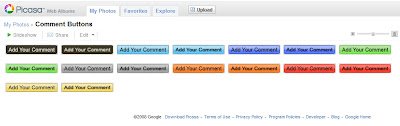
3. Write your blog post as per usual, keeping Picasa open in a separate tab. Once you've finished your post and are ready to add in your comment button, go to where Picasa is open. Choose and click on the button you'd like to add. For this example I'll choose green.
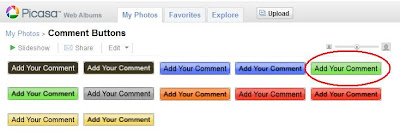
4. Click Embed image on bottom right. Tick the Hide album link box.
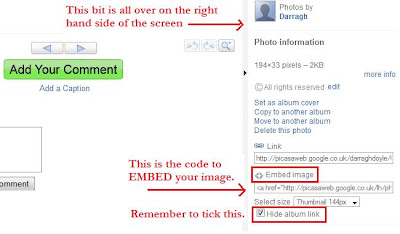
5. Right click with your mouse to copy the code.
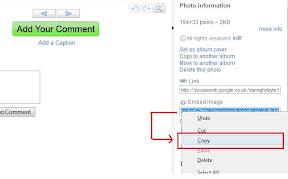
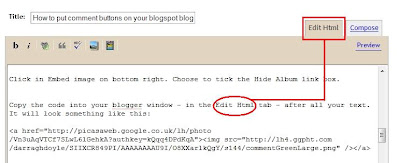
and then paste the code into your Edit Html tab - after all your text. It will look something like this:
6. Then, switch over to the Compose view
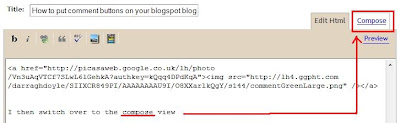
select/highlight the comment button by clicking on it
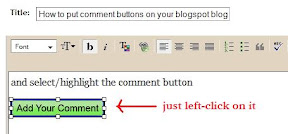
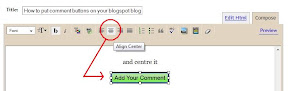
and centre it using the centre button.
You're nearly finished, I promise. After you fill out your labels and everything, all you have to do is publish your post. First though...
7. Open a new tab with your blog in it.

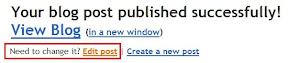
Press publish on your new post. Once it's published IMMEDIATELY choose to Edit this post again.
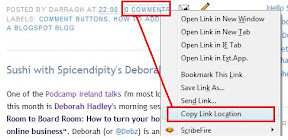
8. Go to the tab with your blog in it and click F5/refresh. You should see your new post there. If everything looks okay, go right down to the end of the post and you'll see a link for 0 Comments. Right click (in Firefox anyhow) and choose to Copy Link Location.
9. Return to your Edit post tab and go to the bottom where you'll see the code for your comment button. Select the URL for the button, then highlight and replace with the comment link.
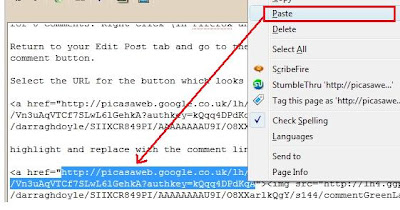

So the code ends up looking something similar to

10. Press publish and that's it! As I said, it appears daunting at first glance, but follow the step-by-step process and you should be fine. It takes me only a couple of seconds each time I do it at this stage :o)
Give it a go and let me know how you get on, please. Any questions, please do let me know.
Showing posts with label how to blog. Show all posts
Tuesday, September 09, 2008
How to put comment buttons on your blogspot blog
Tuesday, August 19, 2008
Talking How to blog on the KCLR 96FM arts show
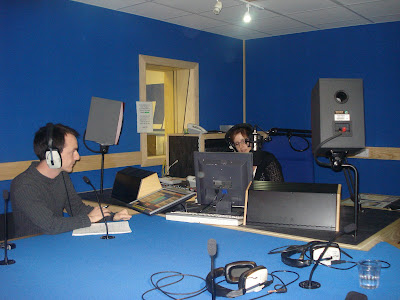
A big thank you to the lovely Aisling Moore from KCLR 96 FM (Kilkenny Carlow Local Radio), the local radio station at home) who invited me to talk about blogging on Kulture Club, the stations's Arts and Culture show. The show airs tonight, Tuesday 19 August from 8pm.
Among the topics on blogging we discussed were:
# The definition of a blog - what it is and isn't.
I've never looked at blogging as an "online diary" where you have to impart everything you do day to day, from the clothes you wear to the food you eat to the style of your hair. Yes, there are blogs that do that, and some very well, but to a beginner I'd advise thinking of a blog as a newspaper written by you.
It's your thoughts on everything from politics to cooking, from reviews of plays to cool new videos you've found online, from current affairs to looking for advice.
Just as with a newspaper, there is no onus on you to have to talk about anything you don't want to talk about, or to feel you have to cover anything you don't feel comfortable with. The same way sports journalists rarely cover fashion advice, you can be confident in writing about what you're passionate about. People who feel the same will then share your passion.
# The "usual suspects" - who blogs?
If you can write an email, you can write a blog. Anyone can be a blogger.
Yes, there are those who consider themselves geeks who blog (and very well too), but there are so many others. From waiters to people who work in shops, from photographers to cooks, from manga enthusiasts to web designers, from singers to authors, from journalists to radio presenters, from gardeners to people who just enjoy it, there's a huge spectrum of people out there at it and a huge amount of blogs to be read.
# What do people blog about?
When Aisling asked me to read one of my posts, I wondered how we'd fit that extra hour it would take in. In the end I chose this one, but I've also talked about:where-as some of my favourite posts (that I can think of offhand) have been
- The first time I met my biological mother
- Memories of where I grew up
- Studying to be a priest
- Being proud of who you are
- Various events I 've volunteered at
- People that I've met including PJ Gallagher, Tommy Tiernan and Pat Ingoldsby
- Amusing things I've done
and so on. It's what I do. What should you blog about? Anything you like, anything you can think of, anything you want to share!
- Grannymar's post about Jack
- Kate's post about her son and music
- Darren's post about adoption
- Lottie's post about the Catholic Church
- Brendan's post about driving through a flood
- Andrew's post about Zimbabwe
- Alexia's post about music concerts
- Claire's photos of baby Anna
- Damien's post about sitting room conferences
# How can people get started?
For personal blogs I recommend checking out www.blogger.com (like this blog) and www.wordpress.com. For those with businesses and services in the Carlow Kilkenny area, I can point you in no better direction than Mr Ken McGuire who'd be happy to help you out.As I've said if you can write an email, you can write a blog. There's nothing scary or technical, nothing too difficult and there's plenty of people who will be happy to help you out.
While I'm at it, check out Ross Costigan's photography, Ciara's blogging here and of course Kilkennymusic.com
I'd also highly recommend checking out Podcamp Ireland in Kilkenny on September 27. There'll certainly be people there who'd be more than happy to help you out.
I look forward to reading yours. Just leave me a comment to let me know it's live.
Kulture Club is on KCLR 96 FM from 8pm tonight. You can listen live here. If you do, let me know what you think. Me mammy will be ever so proud...
Subscribe to:
Posts (Atom)